
Assistant Manager
The Assistant Manager is the core component that powers all of the StrutFit features. It is responsible for rendering the assistant iframe and managing the state for all components. The Assistant Manager must always be present for any StrutFit features to work.
Integrating the Assistant Manager
To integrate the Assistant Manager, you need to add the following script to your website replacing the {{OrganizationId}} with your organization id:
<script
  src="https://store-assistant-assistantmanager.strut.fit"
  async
  data-organization-id="{{OrganizationId}}"
></script>
We recommend simply adding this script to the <head> of your website. It is a small script (~8kb) that will be needed on a lot of different pages and will be cached by the browser.
Required Parameters
data-organization-id: The organization ID for your store. You can find your organization id in the StrutFit dashboard.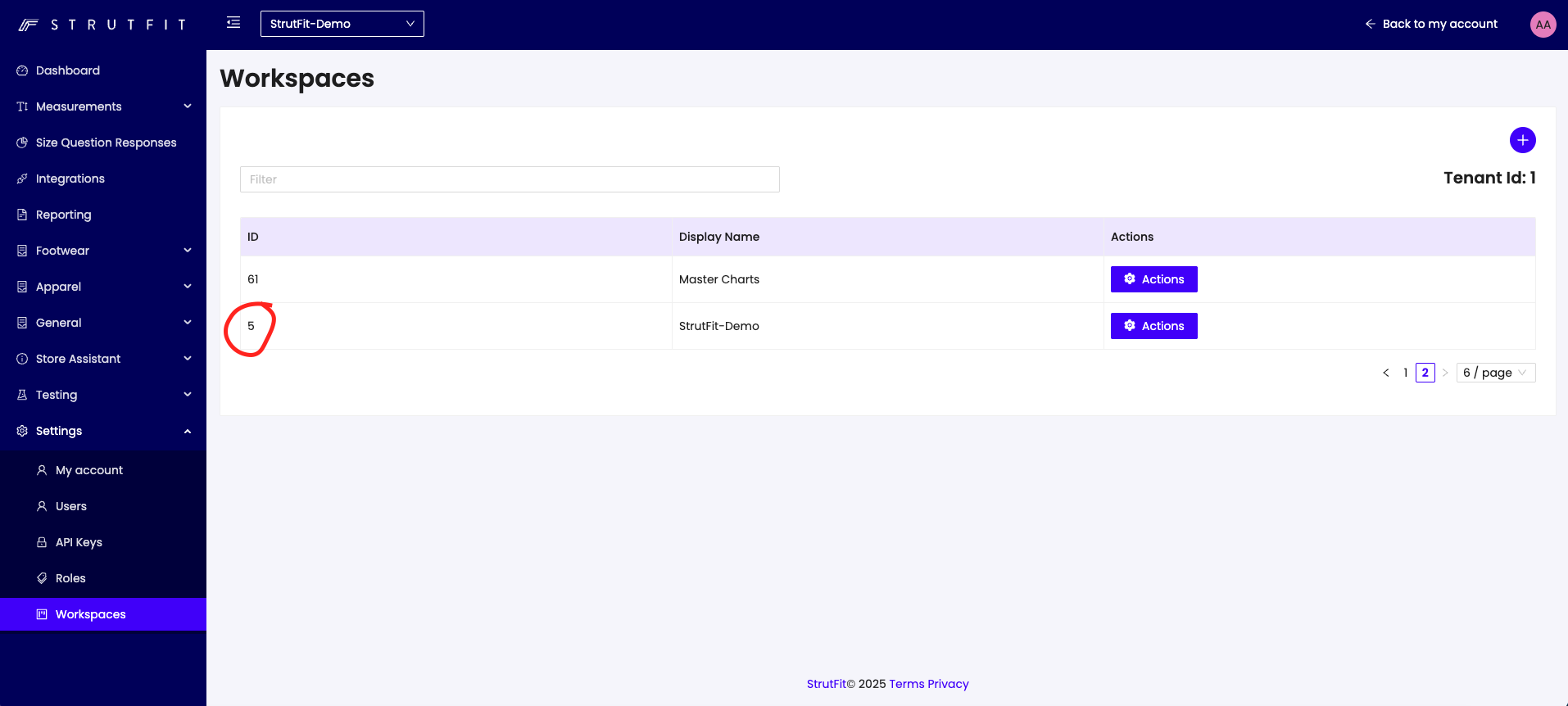
Optional Parameters
-
data-language: The language of the assistant. Defaults to en. The language of the assistant is decided in this priority order:- If the user has specified a language in the StrutFit iframe.
- The language set on the Assistant Manager script.
- The language of the document/website.
- The language of the user's browser.
- English.
For a list of supported languages, see the Assistant Manager API page.
-
data-position: The position of the assistant iframe. Defaults to bottom-right. Other valid values are: bottom-left, top-right, top-left, center.
Using the Assistant Manager API
The Assistant Manager API is the primary way to interact with the Assistant Manager. It allows you to open and close agents, send messages to agents, and listen for events from the Assistant Manager.