Guides
Events We Receive
Size Button CTA
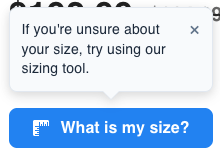
The Size Button CTA lets you show a short message next to a specific Size Button on demand. It is most often used after a shopper adds multiple sizes of the same product to the cart, to point them toward the size tool before they check out.
Prerequisites
- Include the size button script and render
<strutfit-size-button>with the correctproduct-code(see Size Button). - Give each button a stable
id, so you can target the right instance. See Size Button Options for the full attribute list.
Dispatching the event
Listen on window is not required for basic use—you only need to dispatch a CustomEvent:
| Property | Value |
|---|---|
| Event name | strutfit:showSizeButtonCTA |
detail.id | Required. Must match the size button instance you want (see below). If id is omitted from detail, the event is ignored. |
detail.position | Optional. top (default) shows the message above the button; bottom shows it below. |
window.dispatchEvent(
  new CustomEvent('strutfit:showSizeButtonCTA', {
    detail: {
      id: 'product-page-size-btn',
      position: 'top', // optional; omit or use 'top' for above the button
    },
  })
);
How id matching works
The event detail.id is compared to the id attribute on <strutfit-size-button> using string coercion (String(detail.id) === String(buttonId)), so values that stringify the same will match.
- If the element has
id="product-page-size-btn", dispatchdetail: { id: 'product-page-size-btn' }. - If the element has no
id, the instance is treated as''. Dispatchdetail: { id: '' }to target it. This is only safe when a single button on the page has noid.
Behavior
- Copy: The message text comes from StrutFit’s
ToolTiptexttranslation for the current language. It cannot be overridden per event. - Visibility: The CTA appears only when the shopper does not already have a StrutFit size for that product on the page. If they already have a size, the tooltip will not show in a useful way—use a test profile without a saved size when verifying integration.
- Placement: Controlled by
detail.position(topdefault,bottombelow the button). - Scroll: When the CTA is shown, the page scrolls so the size button is brought into view smoothly.
- Dismiss: Shoppers can close the message with the control on the tooltip. Dispatching the event again increments an internal generation so the CTA can appear again after dismissal.
Example
Markup:
<strutfit-size-button id="pdp-size" product-code="{{ProductIdentifier}}"></strutfit-size-button>After your cart logic detects multiple sizes of the same product (or whatever rule you use):
window.dispatchEvent(
  new CustomEvent('strutfit:showSizeButtonCTA', {
    detail: { id: 'pdp-size', position: 'bottom' },
  })
);
It should look like this: